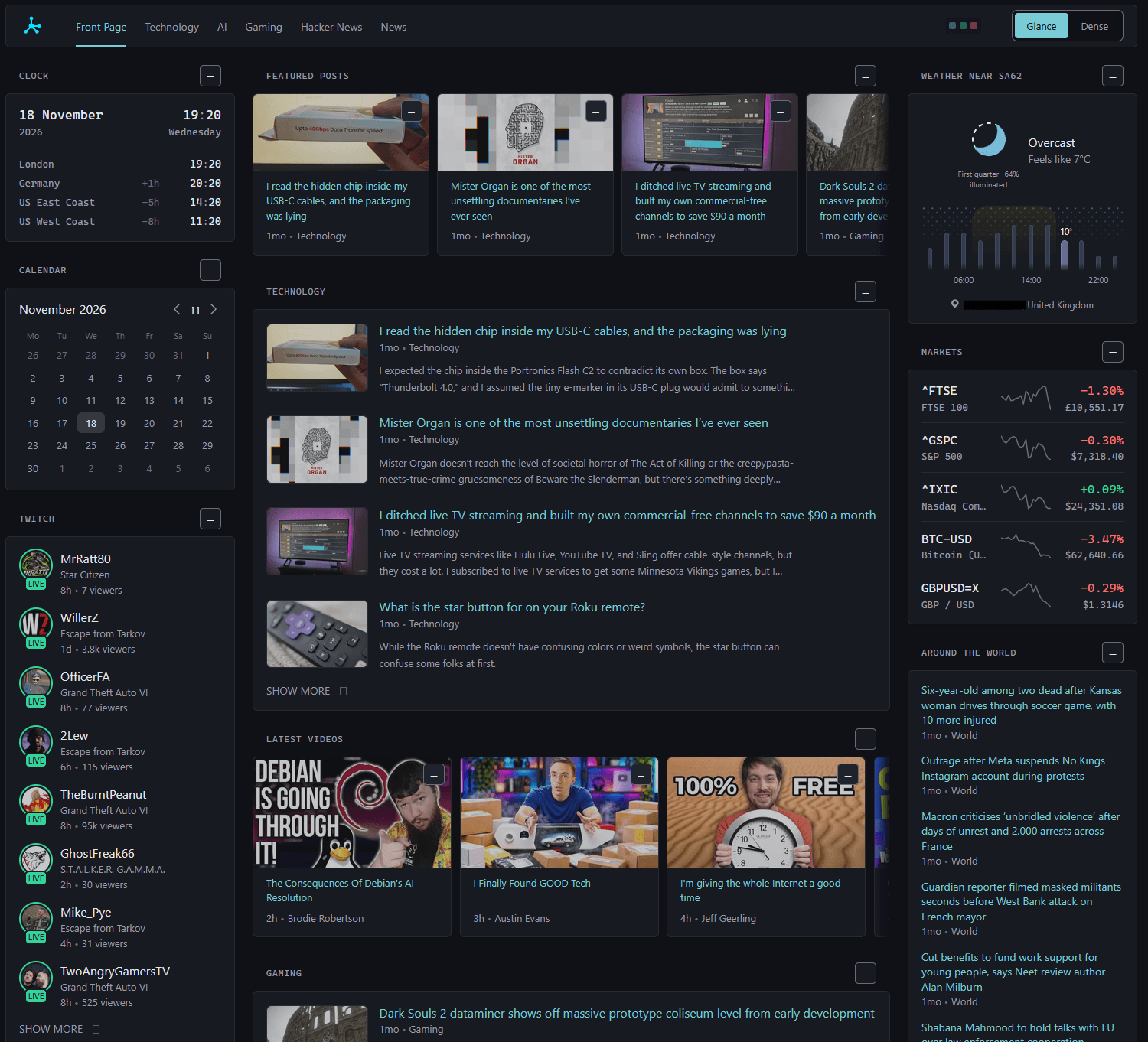
Tired of bouncing between dozens of news tabs and bloat-ware extensions? Here is how I vibe-coded a custom, cross-device browser start page and hosted it on my home server in a single afternoon.
Every morning used to start with the exact same friction. I would sit down at my desk with a glass of water and open the same ten tabs to catch up on tech news, repositories, and daily feeds, bouncing between bookmarks, Hacker News, YouTube, Twitch, and random news sites just to see what was going on.
What I really missed was the classic customisable start page that Google Chrome used to have years ago, back before browser 'New Tab' screens were turned into algorithmic ad feeds and cluttered search bars. You used to be able to open a browser, scan everything you cared about at a glance, and get on with your day.
There are plenty of browser extensions that promise to bring that feeling back, alongside open-source homelab dashboards like Glance, Homepage, or Dashy. The problem with browser extensions is lock-in. I don't always use Chrome, and I wanted the exact same start page whether I was on my main workstation, a laptop, or checking things from my phone. On the flip side, most off-the-shelf dashboard apps mean wrestling with endless YAML configuration files just to get a layout that still doesn't quite fit how you read.
So instead of hunting for another tool to configure, I decided to just vibe-code my own in an afternoon.
When Vibe Coding Makes Total Sense
I spend a lot of time writing about software architecture and why agentic coding won't make software developers extinct when you are pushing 30 PRs a day into core enterprise infrastructure. Production systems with customer data and complex state need strict architectural governance and deterministic test harnesses.
A personal dashboard running on my own local network is the exact opposite. This is where modern AI-assisted coding genuinely shines: solving a personal annoyance in an afternoon instead of turning it into a two-weekend side project. When the blast radius of a bug is just a slightly crooked CSS card on my morning news feed, the goal isn't enterprise ceremony. The goal is speed to utility.
From Prompt to Container in One Sitting
I started with a clear brief: a fast, high-density dark-mode command centre with zero tracking, zero algorithmic noise, and zero cookie banners.
After a few back-and-forth iterations to dial in the three-column grid and feed parsers, I ended up with a single screen that replaces almost every tab I used to open manually:
Topic-filtered feeds: Top-level navigation tabs for Technology, AI, Gaming, Hacker News, and Dev.to, paired with a featured story carousel across the top and clean article cards underneath.
Media without the algorithm: A dedicated YouTube grid pulling latest uploads from channels I actually follow, alongside a live Twitch sidebar showing who is currently streaming and their viewer counts, without getting sucked into autoplay recommendations.
At-a-glance context: A left rail with world timezones and a monthly calendar, balanced on the right by local hourly weather, live market and crypto tickers (FTSE, S&P, Nasdaq, BTC), and breaking world headlines.
No bloated frontend frameworks, no third-party accounts, and no fighting a YouTube homepage engineered to waste twenty minutes of my morning. To keep deployment effortless, I asked the AI to generate a ultra-slim Dockerfile to package the application.
Once the UI felt sharp on both desktop and mobile viewports, I built the image and dropped it straight onto my server host.
Browser-Agnostic and Zero Maintenance
Because it runs inside a Docker container on my local network, building upon the infrastructure I set up in My Home Lab: From Zero to Running Containers, it works everywhere out of the box. I pointed my default homepage and new-tab URL to the container address across every browser and device I own.
Now, whether I open Firefox, Chrome, or a mobile browser on the sofa, I get the exact same instant welcome screen. If I decide next month that I want to add a new feed tab, drop a noisy source, or tweak a market ticker, I don't have to fight a plugin developer's settings menu or read documentation for someone else's dashboard. One quick prompt, a container rebuild, and it is live.
Software used to carry a high enough time tax that we tolerated mildly annoying generic tools for our daily habits because building a custom replacement took too many evenings. Now, when a workflow you miss disappears or gets buried under algorithmic bloat, you can build the exact version you want in an afternoon, drop it in Docker, and own it yourself.