
As a developer, I didn't just want to use an AI writer, I wanted to build one. I integrated Google's Gemini LLM directly into my blog's CMS to create a first-class writing assistant. Here's a look at the surprisingly easy API integration, enhanced security with a two-lambda architecture, the real challenge of prompt engineering and UX, and how it leverages vectorisation and embedding to provide context-aware assistance.
The Developer's Conundrum: Build vs Buy Integrating AI into My Blog
There’s a certain irony in using an AI to help draft a blog post about integrating an AI into my blog. But as a full-stack developer with over two decades in this field, I've always believed that the most valuable insights come from actively using the technologies we build. For years, I’ve been working with cutting-edge AI/ML technologies, creating everything from a Context-Aware AI Guidance System to complex, AI-Integrated Content Creation Workflows for clients. It was high time I brought that same power to my own digital workbench.
My personal blog is more than just a platform for sharing thoughts; it's a living project, a home lab where I can experiment and refine my skills. Recently, I embarked on a mission to streamline my own content creation process. The goal: to build a first-class writing assistant, powered by Google's Gemini LLM (Large Language Model), directly into my blog's content management system. And I have to admit, the entire process was much more straightforward than I expected, though not for the reasons you might think.
Why Bother? The Motivation for a Smarter CMS
The biggest hurdle in maintaining a technical blog isn't a lack of ideas it's the friction of turning those ideas into a structured, well-written draft. I often found myself jotting down notes in one application, outlining in another, and finally writing in my CMS. It was a disjointed process that stifled momentum.
Integrating an LLM offered a clear solution:
Overcoming the Blank Page: A simple prompt can generate a solid first draft, providing a scaffold to build upon.
Iterative Refinement: A chat-based interface allows for a conversational approach to editing. I can ask the AI to "rephrase this paragraph to be more professional," "explain this concept to a beginner," or "expand on this point with an example."
Conversational Editing: The AI assistant allows for conversational editing of the post.
Consolidating My Workflow: All the tools I need, drafting, refinement, and even image generation, are now in one place.
This project also aligns perfectly with the principles I outline in my AI Engineering Playbook. It’s a practical application of prompt engineering and API integration to solve a real-world problem, reinforcing the idea that AI is most powerful when it acts as a co-pilot, augmenting human capability rather than replacing it.
More Than Just an API Call: Vectorisation and Context
It’s important to understand that this AI blog isn't just a simple API call to a Large Language Model. The system vectorises my previous blog posts and projects, and any new content I add. It then embeds these vectors to use as reference material when generating new content or editing existing posts. This allows the AI to understand my writing style, the topics I cover, and the specific details of my past work. This grounding ensures the AI can provide relevant and consistent assistance.
Currently, file search functionality is only available in the Python SDK (google-genai). The JavaScript/TypeScript SDK (@google/generative-ai v0.24.1) doesn't yet support it natively. The current implementation uses Jaccard similarity and query coverage as a fallback for finding similar content.
The Deceptively Easy Part: The API Integration
From a purely technical standpoint, the integration was refreshingly simple. Google's Gemini API is remarkably easy to use. You can explore it further on Google AI Studio.
Here's a more detailed example of how to interact with the Gemini API using TypeScript:
import { GoogleGenerativeAI } from '@google/generative-ai';

// Define a type for the Lambda event
interface LambdaEvent {
  prompt?: string; // Make the prompt optional
}

const genAI = new GoogleGenerativeAI(process.env.GEMINI_API_KEY);
const model = genAI.getGenerativeModel({ model: 'gemini-1.5-pro-latest' });

async function generateText(prompt: string): Promise {
  try {
    const result = await model.generateContent(prompt);
    const response = await result.response;
    const text = response.text();
    return text;
  } catch (error) {
    console.error('Error generating text:', error);
    throw new Error('Failed to generate text from Gemini API');
  }
}

// Example usage (in a Lambda function or similar)
exports.handler = async (event: LambdaEvent) => {
  try {
    // Check if the prompt exists and is a string
    if (!event.prompt || typeof event.prompt !== 'string') {
      return {
        statusCode: 400,
        body: JSON.stringify({ error: 'Prompt is required and must be a string' }),
      };
    }

    const userPrompt = event.prompt;
    const generatedText = await generateText(userPrompt);
    return {
      statusCode: 200,
      body: JSON.stringify({ generatedText }),
    };
  } catch (error: any) {
    console.error('Lambda function error:', error);
    return {
      statusCode: 500,
      body: JSON.stringify({ error: error.message || 'Internal Server Error' }),
    };
  }
};
To enhance security, we've implemented a two-lambda architecture for each model call. Instead of directly calling the Gemini API, the frontend triggers one Lambda function, which in turn invokes a second Lambda function dedicated solely to interacting with the Gemini API. This approach isolates the API key and sensitive credentials within the secure environment of the second Lambda, preventing direct exposure and potential vulnerabilities. This dramatically reduces the risk of compromised API keys.
This architecture adheres to the principle of least privilege, granting the frontend Lambda only the permission to invoke the backend Lambda, and the backend Lambda only the permission to call the Gemini API. This limits the blast radius in case of a security breach. Furthermore, by keeping the API key isolated within the backend Lambda, the attack surface is reduced. Communication between the two Lambdas can be secured using IAM roles, ensuring that only authorised functions can access the Gemini API.
The Real Challenge: Prompting and UX
The true difficulty wasn't in the plumbing of the API integration itself. Instead, the bulk of the effort and where the real skill lies was in prompt engineering and building a good user experience. My service layer, about 600 lines of TypeScript, isn't complex because of the API; it's dedicated almost entirely to managing conversation history for context, constructing dynamic prompts, and parsing the AI's responses to fit seamlessly into the user workflow.
Here are some example prompts related to blog post creation, showing how to combine different prompt components for better results:
"Outline a blog post on the topic 'Benefits of Serverless Architecture', focusing on cost savings, scalability, and reduced operational overhead. Use a professional and informative tone. Include a section comparing serverless to traditional infrastructure."
"Rewrite this paragraph to be more concise and professional, focusing on the core value proposition: 'This new feature is really good and allows users to do things better'."
"Explain the concept of 'Kubernetes Pods' to a beginner with no prior knowledge, using an analogy to shipping containers. Include a diagram if possible (if image generation is enabled)."
The New Workflow: From Idea to Post in Record Time
So, what does my writing process look like now? It’s a collaborative dance between human direction and AI acceleration, all managed from a single, integrated interface that brings the AI assistant directly into the content editor.
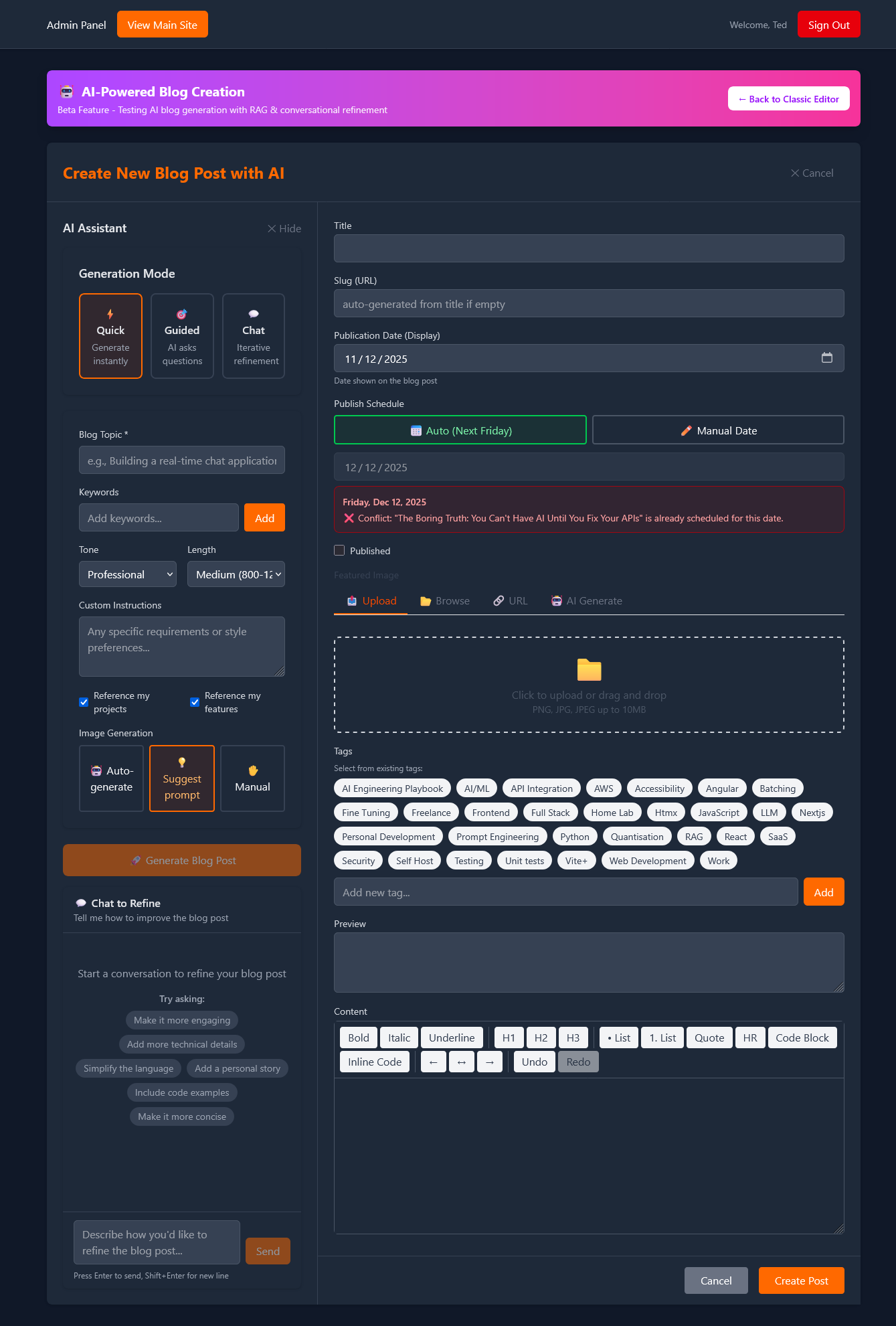
This very post was outlined and drafted using the system. I provided the initial topic, key points from my experience, the desired tone, and a few project names to reference. The AI generated a comprehensive draft, which I then edited, refined, and infused with my own personal voice and deeper technical insights.
The AI handles the heavy lifting of structuring paragraphs and ensuring a logical flow, freeing me up to focus on the nuance, accuracy, and personal anecdotes that make a post authentic. The chat feature is the real game-changer, allowing me to treat the drafting process like a conversation with an assistant.
Final Thoughts: A Practical Step Forward
Integrating an LLM into a personal project like a blog CMS is a fantastic way to gain hands-on experience with a transformative technology. While my work on more complex systems involving RAG or fine-tuning is a different beast entirely, this project proves that powerful, high-impact AI features are more accessible to full-stack developers than ever before.
If you're a developer with an existing application, I encourage you to look for opportunities to enhance it with AI. You might be surprised at how simple the API integration is. The real, rewarding challenge lies in mastering prompt engineering and designing a user experience that truly leverages the AI as a creative partner. It's a practical, rewarding, and highly relevant skill to add to your toolkit.